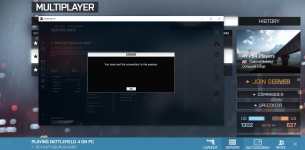
Getting endless Lost Connection to Session errors everytime

Start the EA app and let it launch into the server. Then look at the browser, at the bottom, looks like this when you're joining View attachment 9518

when you get disco'ed, go back to your browser and look at the bottom for a red bar.

The dialog box seen in post #19 never enables the continue button within that dialog box after starting the EA App. Therefore I can never truly join from battlelog. AKA the browser dialog window goes to a waiting for ea app state the continue never enables and no status updates from the ea app go back to the browser.
 

Attachments
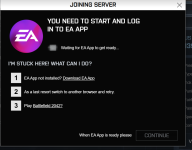
  • battlelogwaitingforeaap.png
    battlelogwaitingforeaap.png
    109.6 KB · Views: 6
Last edited:
have you tried downloading punkbuster and reinstalling it. this sounds like punkbuster problems. i had the same issue a month or so ago. something i installed or something i messed with borked one of the punkbuster services. i'd get connected, play for a min, then get kicked. had to uninstall and then did reinstall in admin mode (right click exe run as admin).
 
  • Like
Reactions: repeat0ffender
have you tried downloading punkbuster and reinstalling it. this sounds like punkbuster problems. i had the same issue a month or so ago. something i installed or something i messed with borked one of the punkbuster services. i'd get connected, play for a min, then get kicked. had to uninstall and then did reinstall in admin mode (right click exe run as admin).

I have and no luck with it.
 
The dialog box seen in post #19 never enables the continue button within that dialog box after starting the EA App. Therefore I can never truly join from battlelog. AKA the browser dialog window goes to a waiting for ea app state the continue never enables and no status updates from the ea app go back to the browser.
I've seen that dialog box. If I am trying to use the official Battlefield log, i have to open EA first.
 
  • Like
Reactions: repeat0ffender
You need to clear your browser cache/cookies, I had a similar problem with the ea app dialog box but could still launch though the bf4 program. Clearing the browser fixed it for me.
 
Finally have a hint. Even though PunkBuster has been redone twice...

Just went through the servers listed on the EA App and was actually able to join a few. The ones that successfully launched did not advertise PBBans. Ones that advertised PBBans were a hard no with the session connection being lost.
 
  • Wow
Reactions: whitefish21
Mid game last night I instadropped with the old dialog window stating that I lost connection. Since then every time I try to join RC1/Any other server I get that message.
Windows 10. Haven't installed or modified anything before or after this message started. Saw a few thing on google but they seemed whacked. Thanks.

View attachment 9515

I use this extension on Chrome to check if my ISP or modem has created the issue.

Internet Connection Monitor

 
I hate things like this.
Just fired it up to work some more on this problem and it worked without me changing a damn thing on the pc or my home network.
Oh well, at least my carpal tunnel syndrome enjoyed the break.
Thanks to all who have replied with possible solutions.
Hopefully it will be working tonight so I can get my fix. Gotta do somethings for a while yet.
🍻
 
Settled in with dinner and a glass of wine.....

and back to the same problem.

Awareness Battlefield GIF
 
hey repeat have you restarted your computer or killed the ea app in task manager

I have done everything but dodge a @RedKilla UCAV.
Killed NordVPN software. Reinstalled PunkBuster multiple times. Reset internet modem and router. Launched from battlelog and EA app. Unplugged every device connected to the router. Installed @Animalllllll internet monitor chrome extension. Reinstalled BF4.
Have not installed nor uninstalled anything outside of PunkBuster and BF4.
Something is flaky as it works on rare occasion and I cannot figure out what Chemical X is that is in play.
 
Not sure how this latest information comes into play but...
If I use a VPN I can get into our server but immediately get VPN kicked, but I load the game.
If I try our server without a VPN I get the message see in post #1.
 
Not sure how this latest information comes into play but...
If I use a VPN I can get into our server but immediately get VPN kicked, but I load the game.
If I try our server without a VPN I get the message see in post #1.

I've had that before when tethering on a cellphone for Internet. Sounds like a port is being blocked. Start EA app, then launch the game directly through battlelog (without bf4 running in the background), see what error message comes up. Usually it's udp3659 or something like that.

Also check that bf4 is allowed through the firewall on windows defender on both private and public networks.
 
I've had that before when tethering on a cellphone for Internet. Sounds like a port is being blocked. Start EA app, then launch the game directly through battlelog (without bf4 running in the background), see what error message comes up. Usually it's udp3659 or something like that.

Also check that bf4 is allowed through the firewall on windows defender on both private and public networks.

Killed off all EA via task manager
Start EA App
Goto Battlelog
Launch RC1
I get hung up at the message seen in post #21